

An Outline Offset is an optional secondary line generated from a selected, closed Outline. It is created by adjusting the Offset property of the original Outline. They are used to get an inset of outset of a closed Outline. This can be useful in marine deck panel modeling.
How Offsets are Generated: A new line is drawn that follows the shape of the original Outline but is spaced away from it by the specified offset amount. The Offset Outline displays using a finer dashed pattern to distinguish it from the original.
The Offset amount is controlled in the Properties dialog. Open the Properties Dialog, select a closed Outline, and modify the Offset amount (which is in project units). A positive value creates a larger area (an outset). A negative value creates a smaller area (an inset). Setting the offset value to zero (0) will remove the Offset Outline display. ** For now, Outline Offsets do not work for Outlines drawn on non-Plane curved surfaces – if there is an Offset value, it is ignored.
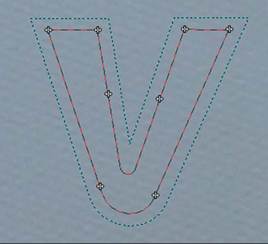
During the offsetting, the method attempts to retain the original shape. However, if the offset distance would cause the new line to self-intersect (e.g., in sharp inner corners like a 'V' shape), the offset shape is adjusted to prevent this. Example: as the offset distance increases, a sharp 'V' shape might be shallowed or virtually removed in the Offset Outline to maintain a valid path (no self-intersections). Here is an example where the blue Outline Offset follows the red Outline keeping at least the offset distance away from it:
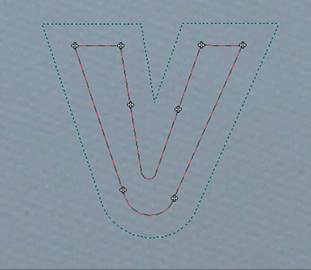
If the distance is increased the area in the center of the V causes self-intersections so it is adjusted to create a shallower ‘V’ in the Outline Offset (left). Increasing the distance again and the self intersections means the ‘V’ in the Outline Offset is virtually removed (right).
Outline Offsets are parametric. This means they automatically update and adjust whenever the original Outline changes. This includes
• Dragging or moving Outline points.
• Changing associated surfaces.
• Adjusting fillet properties.
Outline Offsets have these dependencies:
• If the original Outline is deleted, its associated Offset Outline will also be deleted.
• If the original Outline is no longer closed or does not have a 3D position, the Outline Offset will not be displayed. Note an Outline with one or more failed fillets (drawn as straight lines) is considered to be open (and the Offset will not work nor be displayed).
• Offset works when Outlines are on Plane surfaces only (not when Outlines are on NURBS/Curved surfaces).
Outline Offsets visibility is managed via a checkbox in the Photo or 3D viewer Visibility panes. When an Outline Offset is selected, the Measure pane will display its total length. Lastly, Outline Offsets can be exported. They are output as polyline objects. If the original was comprised of Outlines Splines, Lines, Arcs, and/or Fillets - the export is still a single Polyline.
In the properties of a selected Outline, there is setting called Outline Offset Style. These styles control how corners are handled during the offsetting process. The styles are: square, bevel, round and miter. You can try each one to see if it produces offset corners that are more to your liking.